


Hard crashing PC locks up
" No thank you. |

|
" I'm actually curious if people have really tested this (especially 24H2 users). There has been a lot of speculation that this could resolve at least one class of this hard lock: " A reboot would also be required =) I should also add that disabling security features shouldn't be required to play a game and GGG needs to resolve this bug. This post is only to help point development in the right direction (maybe...) Last edited by norj#5385 on Jan 4, 2025, 11:04:56 PM
| |
|
If you OS managed to survive and felt into Bug Check screen (BSOD), please send the memory dumps to GGG (ideally to your manufacturers), but at least to GGG.
The dumps are located in C:\Windows\Minidump or C:\Windows\Memory.dmp Ensure the creation of memory dumps on bug check is enabled on your system using msconfig 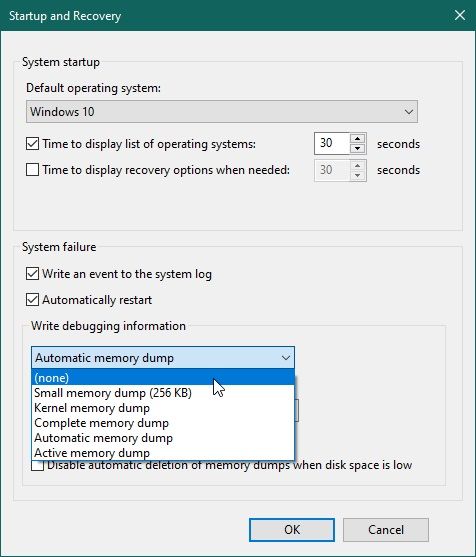  PS If you're unsure what is it, use search and set the things up. Mdumps are VERY useful for the developers, because DxDiag.txt doesn't point to exact place where the problem occured. It's just your configuration report. Last edited by cursorTarget#1174 on Jan 4, 2025, 11:58:43 PM
|

|
|
This happened to me while I just loaded up palworld, first time this ever happened to me. Never had my computer shut down before like that. I don't think this is a poe issue, and I only found out it wasn't an issue isolated through me from poe social media
Have a good day ^.^
| |
|
3 crashes today after 1 hour, after relogging last time, my high tier map is closed for some reason, what a fun experience!!!
|
|
|
Bump
|
|
|
(Almost) Makes the game unplayable, I've had days with 10+ crashes in under an hour. I have the 7800X3D CPU
|
|
|
Can't believe this is still an issue. I am unable to launch the game without this happening within the first 15minutes of the playtime. Unfortunately i bought the game through a third party key seller, otherwise if it was on steam i would be requesting a refund.
|
|
|
7800 x3d in 21H2, sometime the game screen feeze, i have to close the game. if i wait a bit after the game freeze, it will pop a error window "[D3D12] Failed to create resource for texttures". My graphic config in game is DX12.
|
|
" Switch to Vulkan. Direct X is a mess with this game. Windows 11 24H2 (Steam), AMD 5800X3D, RTX 4070 Ti Super 16GB, 32BG DDR4 3200, Samsung 980 Pro SSD
|

|




