


Hard crashing PC locks up
|
bump
|

|
|
I guess the game is still busted?? I don't even want to try it....
|

|
" If you are running the last version of Windows the update should work for you. |

|
|
Just tried booting up the game. Still broken for me.
|
|
|
Still crashing for me as well..
|
|
|
Still happening for me, 12/02.
Details; winver: W11 Pro, 24H2 (OS Build 26100.3037) GPU: Gigabyte 3090 (Driver: 572.16) CPU: AMD 9800x3d RAM: 64gb Corsair Vengence 6400 Mhz SSD: 2TB Samsung 990 Pro (Both windows + POE 1/2 installed here) Unable to rollback as I updated on 18/12 and hadn't played poe for some time. Issue stops if hyperthreading is disabled, but game runs awful without it. POEUncrasher does the trick to stop PC-Wide freezes, but less than ideal. |

|
|
I just received another Win11 update, but my game still freezes/completely locks up my PC.
2025-02 Cumulative Update for Windows 11 Version 24H2 for x64-based Systems (KB5051987) ------------------------------------------------------------------------ PoE 2 - Steam client WinVer: Windows 11 Pro 24H2 (OS Build 26100.3194) RAM: CORSAIR Vengeance RGB Pro 32GB (4 x 8GB) 288-Pin PC RAM DDR4 3600 (PC4 28800) Desktop Memory Model CMW32GX4M4D3600C18 GPU: EVGA FTW3 ULTRA GeForce RTX 3080 12GB GDDR6X PCI Express 4.0 ATX Video Card, LHR 12G-P5-4877-KL CPU: Intel Core i9-11900K - Core i9 11th Gen Rocket Lake 8-Core 3.5 GHz LGA 1200 125W Intel UHD Graphics 750 Desktop Processor - BX8070811900K Motherboard: GIGABYTE Z590 AORUS MASTER LGA 1200 Intel Z590 ATX Motherboard with Triple M.2, PCIe 4.0, USB 3.2 Gen2X2 Type-C, Intel WIFI 6E, AQUANTIA 10GbE LAN BIOS: F10 CPU Cooling:CW-9060048-WW iCUE H150i ELITE CAPELLIX Liquid CPU Cooler PSU: HX Series™ HX1200 — 1200 Watt 80 PLUS® PLATINUM Certified Fully Modular PSU Case: iCUE 7000X RGB Tempered Glass Full-Tower ATX PC Case — Black SSD (Game install location): SAMSUNG 980 PRO SSD 2TB, PCIe 4.0 M.2 2280, Speeds Up-to 6,400MB/s Firmware 5B2QGXA7 SSD (Win11 OS) Samsung SSD 990 Pro 4TB PCIe Gen. 4x4 Firmware 4B2QJXD7 |
|
|
Reminder to use the "--ex-crash-report" to send crash report data to GGG whenever you crash.
For Steam: Goto Library->Path of Exile 2 properties by right-clicking the icon->General->Launch Option-> Add --ex-crash-report to the box. 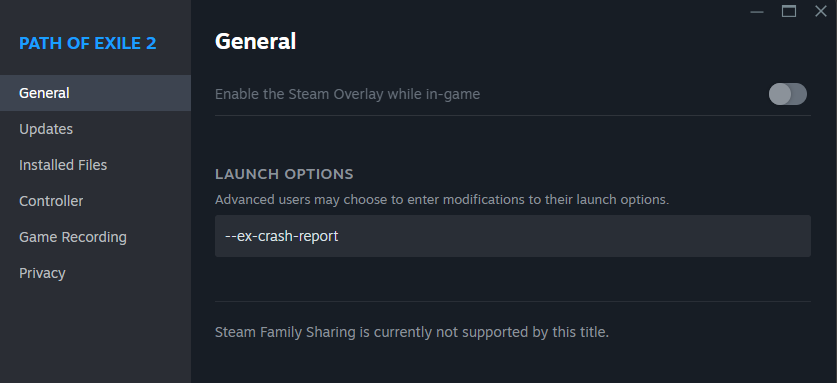 For Standalone client: Right the desktop shortcut->Properties->In the target field add --ex-crash-report 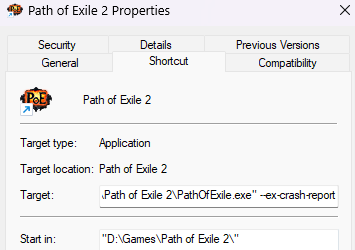 |

|
|
The game still keeps on crashing for many...
There is also the fact that Microsoft have not backed GGG's claim of working with Microsoft to find a better long term solution. They had made an announcement for the case with the Ubisoft, but not with the GGG... So GGG's claim that they are working with Microsoft is suspicious. So once again I'm bumping with these questions, in hopes that maybe they will get answered by GGG's official staff: 1) What went wrong? 2) What you are doing to fix it? 3) What possible causes have you eliminated as the source of the problem? 4) What triggers have you discovered that starts the resource hog loop other than "zone change"? (This one is really important because it allows players to create workarounds) 5) What is your estimated time of fix? 6) How did this sort of bug managed to avoid detection in your testing period? 7) What you will be doing to compensate players that have been affected by this issue? 8) Whether refunds would be made available for those that are no longer interested in playing the game? To other paying customers like me who have spent their money on this faulty product: As long as GGG is not interested in open communication our only other option is to increase the pressure and warn others by giving a negative review for Path of Exile 2 on Steam in a detailed and informative manner. I cannot send/reply to direct messages because my in-game character has not finished Act 1.
What to do: 1)Write a short review about the hard crashes in notepad. 2)Copy and paste it to steam reviews, put up a negative review. 3)Copy and paste it to steam discussions, put it up there. |
|
|
No system freezes since the patch, and I've played for many dozens of hours since.
|

|



