


poe2filter.com - A PoE 2 custom loot filter generation website
 Automatic Economy Updates, Custom Tiering Modes, All Economies, Temple Preset v1.1.140 - 15/02/2026 We're excited to announce v1.1 of PoE2 Filter, introducing several improvements to the economy tiering! Automatic Economy Updates We've finally introduced the long awaited automatic updates of Economy data. The value of all Currency items is now updated every hour, and of all Uniques about once per day. Upon revisiting the tool, you'll be greated with an overview of which Currencies and Uniques moved up or down one or more tiers. You can now also group the items by their new tier instead. If you keep the tool open, every hour, you'll automatically receive the latest data. If you're logged in on pathofexile.com, your filter will even automatically synchronize to your account! All you still have to do is refresh ingame. You can configure this behaviour in detail on the Settings page. We now also keep track of the price history of all items. Hover over any item on the Changelog page or the Tier Lists to see their price evolution, and how much the price increased or decreased since the last update. Custom Tiering Mode Another request we received frequently was the ability to set custom 'cutoff points' for the Drop Tiers. We're happy to introduce this as well! Select the 'Custom' Currency or Unique Tiering Mode, and click the 'Configure' button to fine-tune the cutoff values. You can even select the 'base currency', e.g. 'any item worth at least 2 divines'. Notice that we also (re-) introduced Unique Tiering Modes, with 3 tiers by default: Normal, Strict, and Temple; so that off the shelf, you can now choose to display only the most valuable uniques. Better Unique Pricing We now scrape the trade website for Unique prices ourself, instead of relying on third party API's. Using a sophisticated algorithm, we try to estimate uniques' values more accurately. For instance, when there are sufficient and recent *unidentified* versions of the item sold, this more accurately reflects the actual value of that particular unique when it drops -- all possible outcomes considered. When insufficient data is available, we use the cheapest non-corrupted value (except for always corrupted Uniques), avoiding outliers. In a future update, we will likely further improve this. All Economies Hardcore & Standard players, we've got you covered! You can now select the economy you play in (on a per-filter basis), and we'll use that economy's live data. Note that due to limitations on Path of Exile's Trade API, we limit Standard and Standard Hardcore updates to once per week. You can select your economy on the 'Presets' tab, or under the 'Currency' Quick Filters section. Improved Fixed (SSF) Economy data We've also improved support for SSF player! If you don't care about economy data or the latest meta updates, you can select the 'Fixed' economy, which uses hard-coded values for all Currencies and Uniques. Do double-check whether all your chase Uniques are in the right tiers though. We're very much open to suggestions on how to improve these! Drop by on our <a href="https://discord.gg/JbaMnwngvq" target="_blank">Discord</a> and we'll get you started. Now that 'Fixed' is no longer a separate 'Tiering Mode' but its own 'Economy', this means that, while using the Fixed Economy, you can now also set an Early/Normal/Strict and... Temple Tiering Mode. Temple Preset Better late than never, we've added a 'Temple' Preset, which not only selects the Temple Currency & Unique Tiering Modes, but also hides most other Gear such as Tiered Unidentified Gear (except the best T5 Ring and Amulet Base Types -- which you can easily fine-tune on the Quick Filters) or high iLevel Crafting Bases. Off the shelf, this preset allows you to run or leech even the perfect 77-Room Temple in a full group -- using the Game's default, in-theme cosmetics. Merged Campaign Presets To make place for this extra very-late-game Preset, we had to remove one. We chose to merge the Early & Mid-Campaign Presets into one, since they differed only slightly. To cover for those differences, we added an 'Auto-Leveling Gold' filter, and a 'Show Vendoring Rares/Magics *Until*' setting. These Auto-Leveling filters can perfectly be used until mid-late maps, however, the 'Interludes' and 'Progressing Maps' Presets also still exist and allow more fine-tuning. Moved to Cloudflare host Up until now, PoE2 Filter was hosted on a 'hobby-grade' LAMP server -- it did start as an experimental hobby project after all. Although it held up remarkedly well (undoubtedly due to its extremely light-weight architecture), it was time to change. Moving to Cloudflare should offer best-in-class speed & protection, and it allows us to easily run background jobs. As an occasional reminder, if you want to chip in with the hosting costs or just want to support the project, you can buy me a coffee here: https://buymeacoffee.com/poe2filter/ Other changes and fixes - From the Presets tab, under the 'Endgame Content' section, you can now also choose to hide Jewels, and Overseer & Regular Precusor Tablets. - The 'Gold Style Override' now makes Gold transparent. This will be applied for new filters. To apply this style to an existing filter, enable it from the Presets tab. - Clicking 'Go to rule' after copy/pasting a *currency* item will now navigate to the Currency Tier List and highlight that currency, so you can then easily change its tier (thanks Silasftw). - The legacy 'Guiding Palm' unique was removed. What's next Now that the automatic eco-updates are in place for Currency & Uniques, of course the next step is to add automatic eco-updates for Base Types. That's definitely coming up, but we decided to already release without it in a first phase. PoE1 v3.28 is coming up soon, and we still need to port these v1.1 changes over well beforehand. Author of https://poe2filter.com and https://poe1filter.com - Path of Exile 1 & 2 Custom Filter Generators
|

|
|
Tiered Unidentified Items, Hide Runes - v1.1.141 - 17/02/2026
- GGG listened to my plea and now includes the Unidentified Item Tier when you copy an Unidentified Item! <3 You thus no longer need to manually set this. - Re-added a Runes filter option on the Currency Quick Filters. Due to the extremely low demand, de facto they cannot be sold, regardless of what they occasionally sell for. If you had the 'Temple' Progress Preset selected, this is now enabled automatically. - CTRL+clicking any of the gold rules or leveling gold rules will now navigate to the correct rule on the Quick Filters tab (thanks coldtoiletseat). Author of https://poe2filter.com and https://poe1filter.com - Path of Exile 1 & 2 Custom Filter Generators
|
|
|
I was configuring the filter and wondering if there’s a way to set sockets and quality requirements for crafting bases using the quick filters.
I worked around it by creating custom rules. I set up what I wanted in the tier lists, copied the generated rules, pasted them into the custom rules section at the bottom, and added "quality >=" to each rule. What I’m ultimately trying to do is pick up items with extra sockets that are also exceptional quality. |

|
|
I can't seem to get uniques to hide. I unchecked all the uniques boxes except for the exceptional uniques, and they still show.
Digging into the filter, the following is at the top of my filter. Show # Good Uniques (uniques-good) Rarity == Unique BaseType == "Armoured Vest" "Altar Robe" "Utility Wraps" "Helix Spear" "Garment" "Siphoning Wand" "Crude Bow" "Desolate Crossbow" "Intricate Gloves" "Lattice Sandals" "Ashbark Talisman" "Vaal Cuirass" "Furtive Wraps" "Armoured Cap" "Viper Cap" "Fine Belt" "Heavy Crown" "Primed Quiver" "Shrouded Vest" "Spiritbone Crown" "Aged Cuffs" "Marabout Garb" "Reflecting Staff" "Stone Charm" "Champion Cuirass" "Pronged Spear" "Gauze Wraps" "Long Belt" "Silver Charm" "Layered Gauntlets" "Abyss Precursor Tablet" "Giant Maul" "Conqueror Plate" "Scale Mail" "Fine Bracers" "Spiked Club" "Prismatic Ring" "Permafrost Staff" "Woven Focus" "Gargantuan Mana Flask" "Thawing Charm" "Broadhead Quiver" "Array Buckler" "Trimmed Greaves" "Feathered Sandals" "Iron Crown" "Barbed Spear" "Ritual Precursor Tablet" "Antler Focus" "Jingling Crest Shield" "Felt Cap" "Heavy Bow" |
|
|
I gave up programming Basic and Cobal back in 1989...threw away HTML in 95...PLEASE GOD DON'T MAKE ME CODE AGAIN...
Wish I learned C++ -Time to be funny. The world needs funny right now! Warning: "Might" get you muted.
25 Exalts...oh God my stupidity stuck! Now onto 25 Divines... |

|
|
Small Tiering Mode and other improvements - v1.1.142 - 21/02/2026
- Rejoyce! Finally, the update you've all been waiting for! Because they cannot be hidden in the game, from now on, when Reliquary Keys are in the Hidden tier (looking at you, Twilight key), they will now be displayed small and transparent. - Updated the Fixed (SSF) currency values. They are now based on the average value of the currency in the first 4 weeks of every past league, Hardcore and Softcore. - As a reminder, experienced players are very welcome to help us improve these Fixed Currency & Unique values through crowd-sourcing, also for Path of Exile 1! Join us on Discord and we'll set you up. - When you try to sync a filter which contains an error, the error message received back from GGG is now displayed behind an error icon. - The Quick Filters now also support setting and configuring Custom Currency & Uniques Tiering Modes, and fixed some layout and textual issues (thanks Fabi). - On the Custom Uniques Tiering Mode dialog, the input field will now no longer disable when you try to enter a decimal value (thanks Fabi). 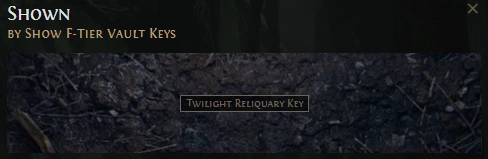 Author of https://poe2filter.com and https://poe1filter.com - Path of Exile 1 & 2 Custom Filter Generators
|
|



