"
"
"
following worked (for me) and game stopped freezing completly, nothing else worked (tried everything with cpu/fps lock, nothing worked) :
make a exception in the Windows defender for follwing folder: "C:///User/User/appdata/roaming/Path of exile 2" --> restart computer one time --> no freezes and much smoother loading without any lag -->
windows defender was checking the shader cache everytime while it was created during the loading
This is the way!! Game is way smoother.
This is probably the most underrated solution! I confirm, the problem is gone and the loads have become very smooth! Some time ago, I noticed that Windows Defender started very aggressively checking new files and loading the processor. POE 2, when loading locations, creates many cache files in this folder, and the defender starts actively checking them, somehow overloading/breaking the system.
I recommend everyone to check this solution!
its realy works, ty. but any way, later, we need fix that issue from developers
|
Posted byFoliant#3041on Dec 20, 2024, 5:42:03 PM
|
|
Happy holidays everyone. If there was any hope for a fix or some communication it would have taken place today, the last day before everyone goes on Christmas break.
Sucks so badly but this will not be fixed until 2025, at the earliest it will be the week of Jan 2, but considering we’re pushing two weeks of radio silence from GGG, it wouldn’t surprise me to see this linger into mid February, possible even March.
|
Posted bychrisEm119#1403on Dec 20, 2024, 5:51:36 PM
|
"
"
"
following worked (for me) and game stopped freezing completly, nothing else worked (tried everything with cpu/fps lock, nothing worked) :
make a exception in the Windows defender for follwing folder: "C:///User/User/appdata/roaming/Path of exile 2" --> restart computer one time --> no freezes and much smoother loading without any lag -->
windows defender was checking the shader cache everytime while it was created during the loading
HOLY HOT TURTLE DOOKIE!
So i've just tried this method. I can tell you this is the best PoE2 has run from since this whole nonsense. Even doing the affinty fixes, power plan etc etc. My CPU would be instalocked to 80%%. would be 100% with out the affinity.
I have not even tried to do the affinity fix. After doing the exclusions. I'm hovering aroud 40-50% cpu usage.
i7 6700
RTX3060
32gbRAM
win10pro
|
Posted byTripV#0220on Dec 20, 2024, 6:08:50 PM
|
|
Someone suggested to turn off HDR on the monitor, aaaand so far so good. Worth a try in my book. Can't confirm yet that it works 100% of course but no crashes so far since doing this.
|
Posted bysnurrfint#5780on Dec 20, 2024, 6:16:50 PM
|
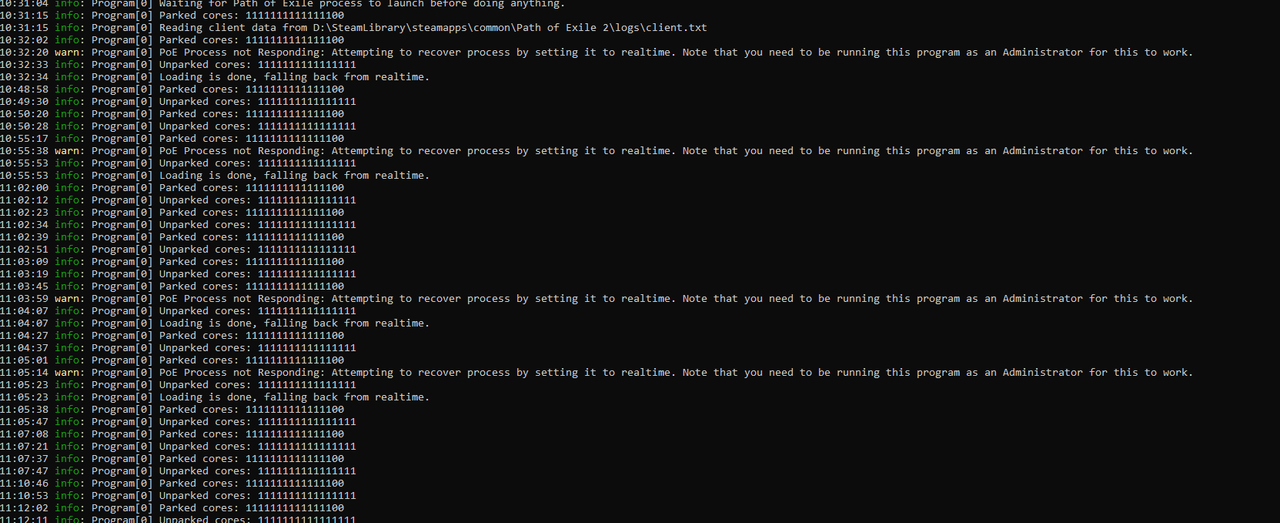
I use https://github.com/Kapps/PoEUncrasher. And I mentioned 4 times that it recovered from a hard freeze (the cog wheels were locked). Thanks my friend, this is genius. I tried to fiddle with so much settings and fixes, but this is it!!!
i7 117700k
4070 rtx
all windows updates up to date (24h2)
all c++ and .NET redistributables up to date Last edited by 69oVerkill69#4406 on Dec 20, 2024, 6:42:15 PM
|
Posted by69oVerkill69#4406on Dec 20, 2024, 6:39:29 PM
|
|
I'm still having this issue. Really frustrating to have to force shut my pc constantly
|
Posted bypingviiniv#5281on Dec 20, 2024, 6:49:04 PM
|
|
Same issue, it started when I made it to act 3 and now it's constantly happening whenever I load into a zone. It's unplayable. Act 3 may be coincidental, as I have also just recently updated to Windows 11 v 24H2.
I load into a zone, the game freezes at the load screen with the gears. I'm then unable to interact with any part of my Windows PC; I cannot CTRL ALT DEL, I cannot CTRL L-SHIFT ESC (to bring up Task Manager). I am forced to hold the power button down on my PC and hard shutdown.
NVIDIA GeForce RTX 2080 Ti
Intel Core i9-9900K 3.60GHz
Graphics all set to default except also using Nvidia DLSS, but also tried lowering graphics.
Last edited by SailboatOfDoom#8865 on Dec 20, 2024, 7:37:12 PM
|
|
|
I have been having this issue non stop since release and I feel like this is degrading my brand new PC...
9800X3D, 4080 Super, 64GB DDR5
I have tried setting POE2 using 2 less CPU cores. This prevents the PC freezing but the game freezes so bad and sometimes I can't even restart my PC.
I notice when the freezing occurs, my fan colors revert back to default and are on high speed. This will stay this way until I manually shut off my PC.
|
Posted bytakgoo#4920on Dec 20, 2024, 7:07:54 PM
|
"
I have been having this issue non stop since release and I feel like this is degrading my brand new PC...
9800X3D, 4080 Super, 64GB DDR5
I have tried setting POE2 using 2 less CPU cores. This prevents the PC freezing but the game freezes so bad and sometimes I can't even restart my PC.
I notice when the freezing occurs, my fan colors revert back to default and are on high speed. This will stay this way until I manually shut off my PC.
I had a similar crash last week and haven’t touched it since. Had no video output on the reboot and the AIO lost its display.
|
Posted bychrisEm119#1403on Dec 20, 2024, 7:20:10 PM
|
"
Guys,
I got Win 11 24H2 build and my games 2 or 3 times per 1 teleport freezed my pc to hard reset button.
But I found one solution and now my game is not freezing whole PC and i think maps loading faster.
Windows -> Settings System -> Display -> Graphics ->
1. Disable HDR mode
2. Disable Optimalization for Windowed Games (I'm playing on windowed mode)
Even Microsoft writing about this "feature" here > https://learn.microsoft.com/en-us/windows/release-health/status-windows-11-24h2#3466msgdesc
"After installing Windows 11, version 24H2, you might experience issues with games if you have AutoHDR enabled in your device. You might observe that the game colors are incorrect in certain display configurations. You might also observe that some games stop responding. "
Good luck :D
Holy shit this actually fixed it for me. After turning off 'Optimizations for windowed games' my game no longer freezes
|
Posted byfailau007#5339on Dec 20, 2024, 7:25:03 PM
|



